
Senior rugby league match day
Set your 13, tap Start Game and log the play as it happens. With Team Stats, Kickd runs live possession, our tackle count and set completion for both teams.
Set up once, at home
About 10 minutes. Do it before round 1.
-
Create your team
Open Kickd and sign in. Tap Create Team, then enter the team name, the sport (Rugby League) and the age group.
U13 and up plays the senior game: 13 a side, two halves and an interchange counter. With Team Stats, possession and set tracking switch on by themselves.
-
Add your players
Go to the TEAM tab at the bottom of the screen. Tap + Add Player and enter a name and shirt number.
Numbers can change week to week. Stats follow the player, not the shirt.
-
Check the format
On the same TEAM tab, check the AGE GROUP. It locks after your first match, so fix it now if it's wrong. Then tap a HALF TIME chip to match your comp.
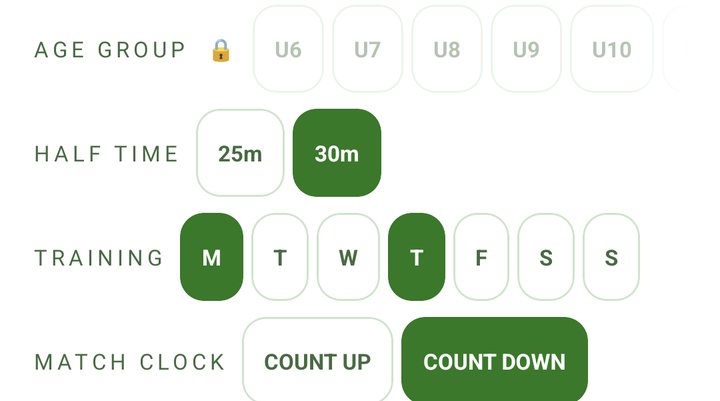
Check the age group and half time on the TEAM tab. -
Pick your season award
Under SEASON AWARD, choose Off, Coach 3-2-1 or Player-voted. For player-voted, set how many places score under VOTE POINTS: 3-2-1, 4-3-2-1 or 5-4-3-2-1.
Both lock once results are logged this season. Full time shows how each award works.
-
Invite parents and helpers
On the TEAM tab, tap Share Join Link under INVITE PARENTS/GUARDIANS (INVITE SUPPORTERS on an Opens team) and send it to your team chat. Parents follow the score live on their own phones. The link is for adults only.
Want a helper to run the clock and log the game? Tap Share PA Link under PERFORMANCE ANALYSTS. They join as your Performance Analyst and run the live screen while you coach.
Borrowing a player for the day? Tap + Add Guest Player. Guests play and get minutes but stay out of your season stats.
| Age | Halves | Interchanges |
|---|---|---|
| U13 to U15 | 2 × 25 min | 10 a match |
| U16 to U18 | 2 × 30 min | 10 a match |
| Opens | 2 × 40 min | 8 a match |
Every grade plays 13 a side. Under HALF TIME, U13 to U15 can switch to 30-minute halves and U16 to U18 to 35.
Best on a tablet. Every stat sits in the column beside the field, one tap away, and the bigger screen makes live logging fast. A phone runs the same match with the same possession banner. Its stats sit behind the round stats button.
Which pass. Team Pass logs the score, interchanges and discipline. Team Stats adds possession, the tackle count, completion % and every player stat, sections 5 to 7 of this sheet. On Report works by tap on every pass (Ref Call or a long-press). Saying it ("report nine") needs Team Stats. Upgrade on the TEAM tab.
Practice first. On HOME, tap Start Practice Game: a pretend match on a sped-up clock, with the full stat set on any pass. Nothing is saved and nobody else sees it, so drill the set calls until they're automatic.
Your three free matches include every stat, so you can see what Team Stats adds before you choose a pass.
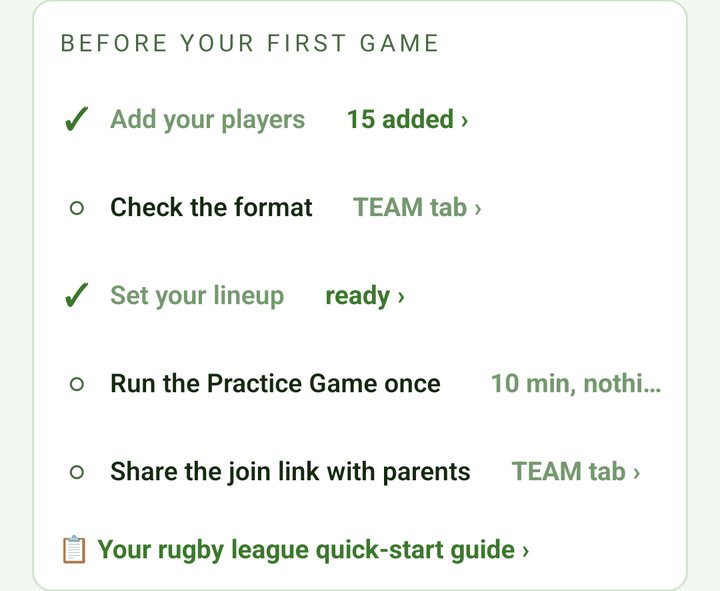
Before kick-off
A couple of minutes on the sideline.
-
Mark who's here
On the home screen, tap any player who didn't turn up to grey them out. Everyone else is in.
Type the other team's name under OPPONENT if you like. It shows on the live screen.
-
Set your starting 13
Tap Set Lineup and fill positions, or tap Auto fill. You only set the start. The live field carries on from there, through the break.
Change any shirt number for this game under THIS WEEK'S NUMBERS. Last week's numbers carry over, and ↻ AUTO numbers your starting 13 by position, with the bench after them.
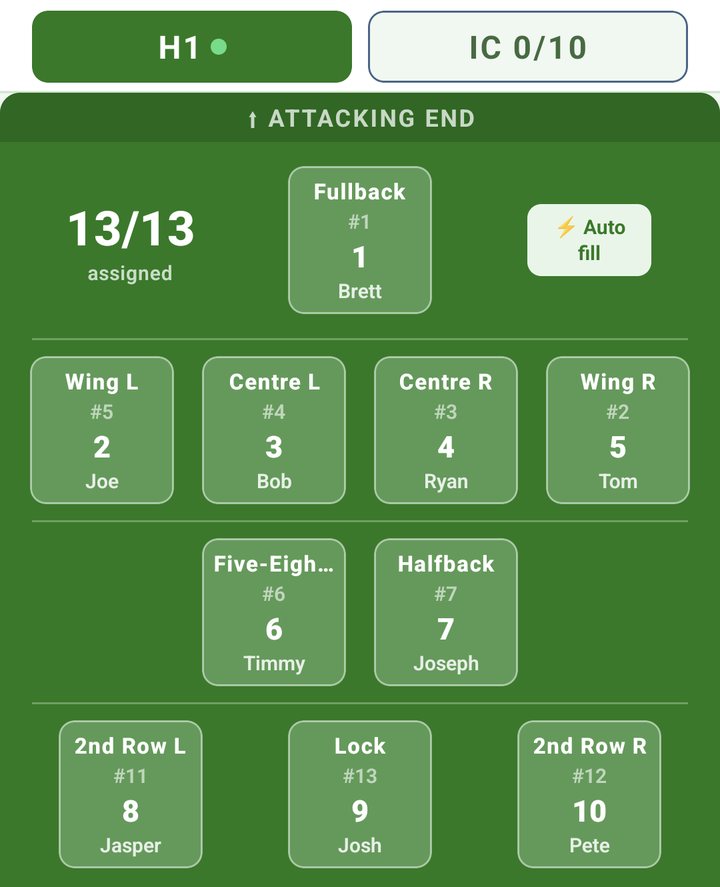
Your starting 13, with Auto fill top right. -
Plan your interchanges
On the same screen, open the IC tab and tap + Add Interchange for each planned swap: who comes off, who goes on and the minute. Plan up to 10, or 8 at Opens.
Kickd alerts you when each one is due. You can still swap anyone by hand at any time.
-
Tap Start Game
The clock runs two halves. If your starting side isn't set, Kickd takes you back to the lineup first.
With Team Stats, possession starts neutral. Set it US or THEM at the first play-the-ball.
On the field
The live screen. This part works on every pass.
| Score | Points |
|---|---|
| Try | 4 |
| Conversion | 2 |
| Penalty Goal | 2 |
| Field Goal | 1 |
-
Log your score
On a phone, tap the US + SCORE cell on the field, pick Try, Conversion, Penalty Goal or Field Goal, then tap the player. On a tablet, tap the score under SCORING beside the field, then the player.
With Team Stats, a conversion then asks GOAL or MISSED, so every kicker's goal-kicking is on record.
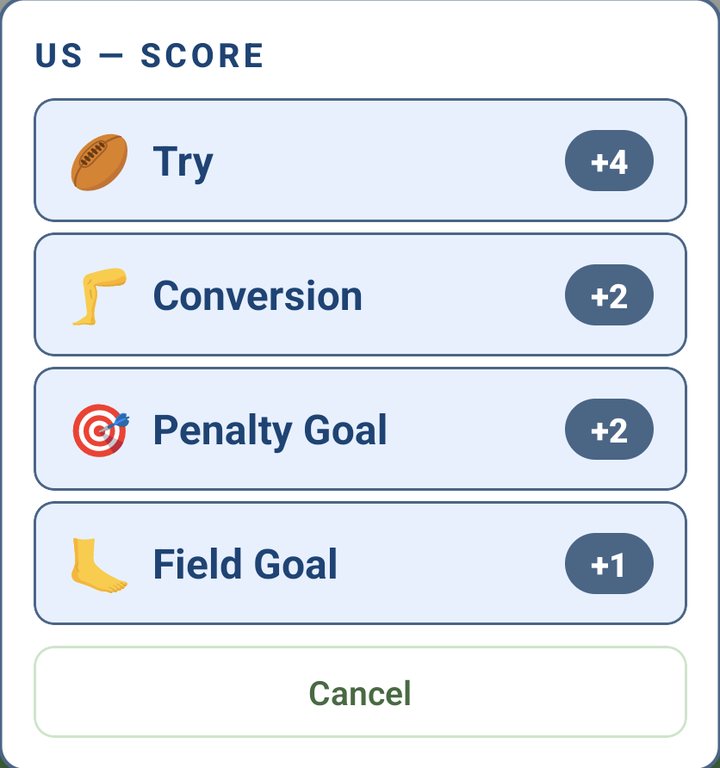
US + SCORE opens the four scores, each with its points. -
Log their score
Tap the THEM + SCORE cell on the field and pick the score. No names needed.
-
Interchange
Tap the player coming off, then the bench player going on. The interchange counter (on the field on a tablet, under it on a phone) counts every swap.
Past 10 (8 at Opens), Kickd still never blocks a swap. A warning shows above the field, so a mis-tap never leaves you a player short.
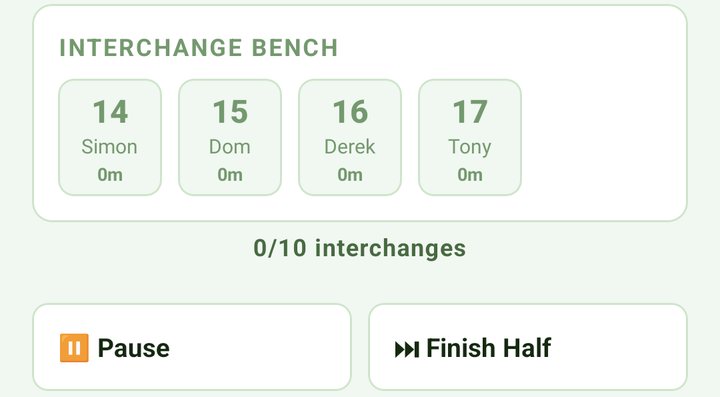
On a phone, the interchange counter and Pause sit under the bench. -
If a player can't go on
Long-press them on the field. The menu offers Unavailable and, for a no-show, Absent - Not Here (clears their minutes), plus the ref's calls. See Discipline.
-
Fix a mistake
On a phone, tap the UNDO cell on the field. On a tablet, tap Undo in the match log. Or say "undo". Undo rebuilds possession and the set count too.
To pause on a tablet, tap the pause button beside the clock. On a phone, Pause sits under the field.
When a planned interchange is due
On a phone, INTERCHANGE NOW shows at the top of the screen when one is due. Tap Accept to make it, or Skip.
On a phone or tablet, the PLANNED INTERCHANGES list under the field marks it NOW. Tap Interchange to make it, or Cancel to skip it.
Discipline
Every pass. The timers run on game time, so they pause with the clock.
-
Long-press the player
On the field. The menu offers Unavailable, Absent - Not Here, Sin Bin, Sent Off, On Report and HIA.
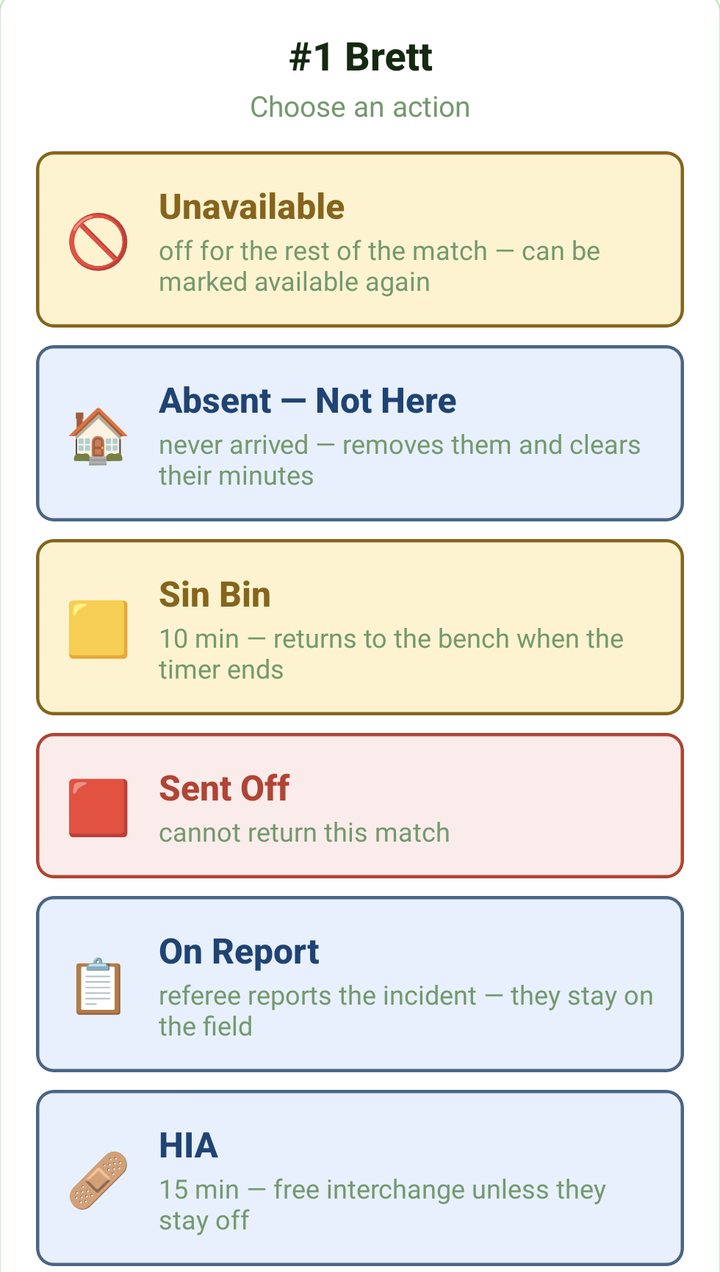
Long-press a player and choose an action. -
Or tap Ref Call
It's a tile in the phone's stats grid (the round stats button), and sits in the DISCIPLINE group on a tablet. Pick Sin Bin, Sent Off or On Report, then tap the player.
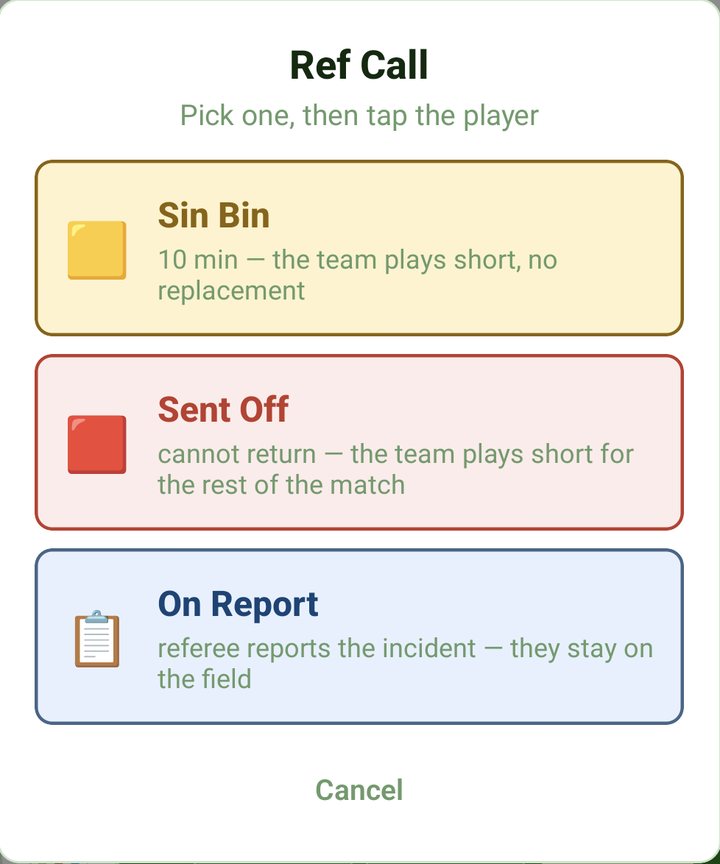
Ref Call: pick the call, then tap the player.
What each one does
- Sin Bin. The team plays short, with no replacement. The 10 minutes starts when they leave the field, not at the ref's call, so tap OFF FIELD as they cross the line.
- Tapped Not yet? The Off field button waits in the discipline panel under the field. When the 10 minutes are up, tap Return to bench.
- Sent Off. They can't come back, and the team plays short for the rest of the match.
- On Report. The ref refers it to the judiciary. The player stays on and it's logged against them.
- HIA. 15 minutes off. Tap a bench player to fill the spot. When the timer ends, or sooner, tap Decide. Back On costs nothing. Stays Off counts one interchange.
- Unavailable. Off for the rest of the match. Tap a bench player to fill the spot, which counts as an interchange. You can mark them available again later.
- Absent - Not Here. For a player who never arrived. It removes them and clears their minutes. Filling the spot doesn't count as an interchange.
Possession and sets
Team Stats. U13 and up, or U10 to U12 with EXTENDED STATS on the TEAM tab.
Every set is six tackles. A set is complete when you get value from it: points, or a kick for territory. It's incomplete when you cough it up early with an error or a penalty. Kickd tracks it live for both teams.
-
Set possession
The POSSESSION banner sits above the field. Tap US or THEM. Each side shows its live completion %.
-
Count our tackles
Log a Hit-up for every carry and the chip counts the set: TACKLE 0 to 5, then LAST TACKLE on the sixth.
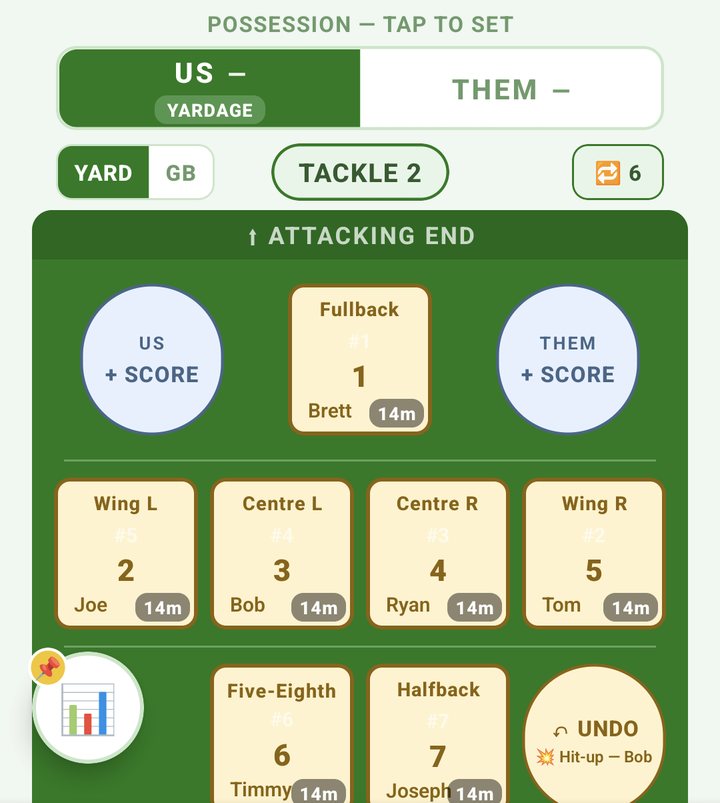
On our ball the chip counts the set, here at TACKLE 2. -
End every set with one call
The call that ends a set is what tells Kickd it happened. Possession flips for you.
-
End their sets too
Don't log their tackles. Tap the THEM + SCORE cell, tap the END BALL their set ended on (1 to 6), then pick how it ended.
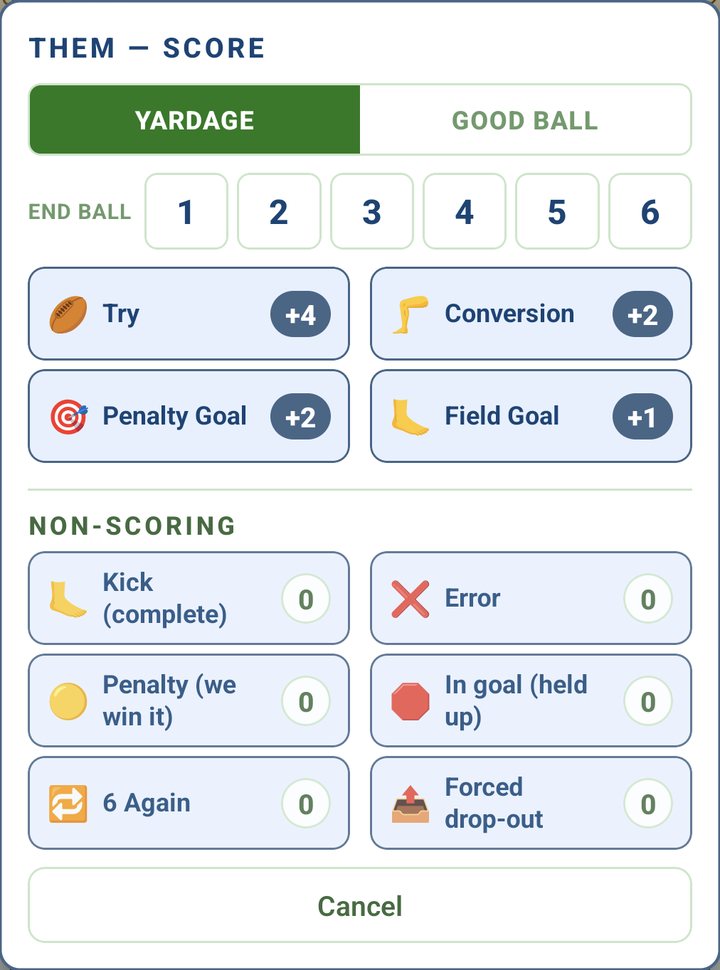
Their set: tap the END BALL, then how it ended.
How our set ends
- Complete, ball to them: a try or any score, or a kick.
- Incomplete, ball to them: an error, or a penalty they win.
- Complete, and we keep it: a 40/20, a forced drop-out or held up in goal. The next set starts as Good Ball.
- Complete, fresh six: a penalty we win during our set.
- Six again: no new set. Tap 6 AGAIN on the banner (6 on a phone). The count resets and the same set rolls on, with completion % untouched.
How their set ends
- They finish it: a try or other score, or a kick. The ball comes back to us.
- They blow it: an error, or a penalty we win (Penalty (we win it) in the THEM menu). Their completion % takes the hit, so half time shows both teams' numbers.
- Held up, or they force our drop-out: complete, and they keep the ball for a Good Ball set.
- Their six again: tap 6 AGAIN on the banner while they have the ball, or 6 Again in the THEM menu.
Never leave a set open, ours or theirs. Possession reads wrong? Tap US or THEM on the banner. That's a correction only, and no set is recorded.
Good ball or yardage
Every new set starts as Yardage: grinding out of your own half, where a kick on the last is the win. That's most sets, so touch nothing.
Got the ball in attacking field position? Tap GOOD BALL on the banner, left of the tackle chip (GB on a phone). These are the sets you must finish, and the ones worth reviewing when you don't.
Flip their sets the same way while they have the ball.
Half time shows completion three ways: Yardage, Good Ball and Overall. A healthy 66% overall can hide 43% in good ball. The flag is what shows it.
Log the stats
Team Stats. Tap the stat, then the player.
On a phone, tap the round stats button at the bottom left, pick a stat, then tap the player on the field. On a tablet, tap the stat in the column beside the field, then the player.
The stats: Hit-up, Unload (Hit-up), In Goal, Try Assist, Line Break, Kick, 40/20, Forced Drop-out, Tackle, Missed Tackle, Error and Penalty. Most log once, then disarm.
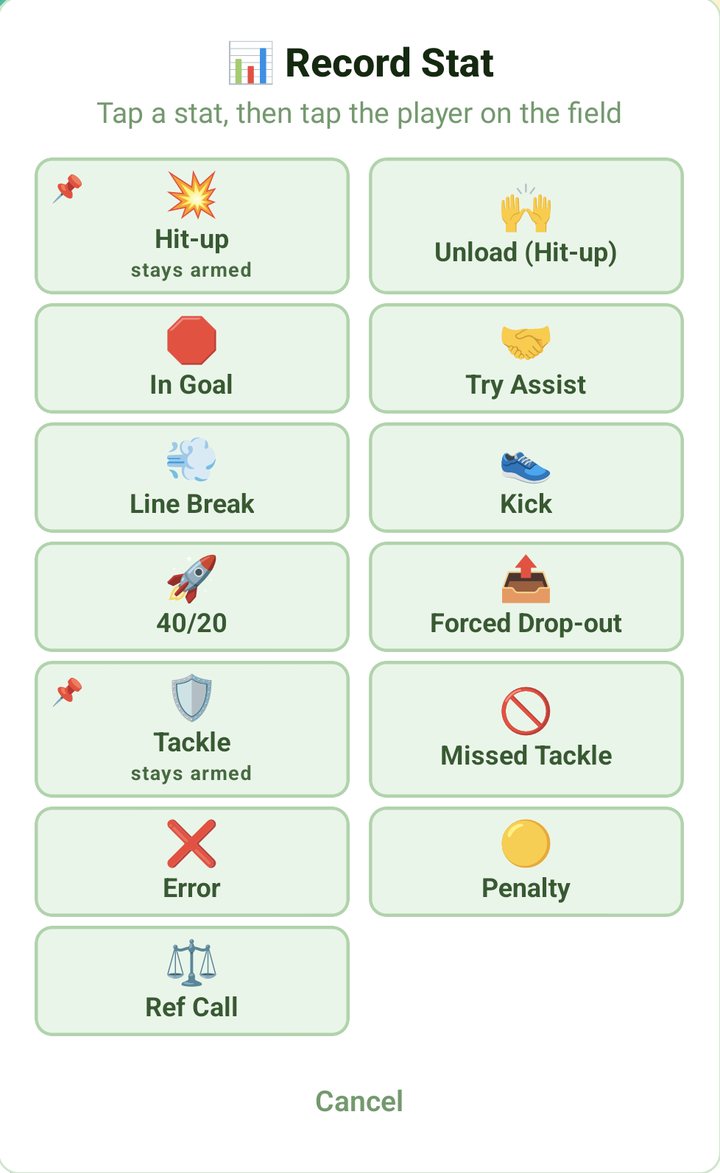
Pin the busy ones
Hit-up and Tackle stay armed after each tap, so you just tap shirts. Pin Hit-up in attack and Tackle in defence.
To stop, tap the amber banner under the field on a phone, or the button again on a tablet. Picking another stat stops it too, and Tackle unpins itself when the ball comes back to us.
Offloads
Unload (Hit-up) is an offload out of the tackle. It counts for the player but doesn't move the tackle count.
Errors
Tap Error and pick the type: Drop ball, Forward pass, Knock on, Out on the full or Other. Then tap the player. The set ends incomplete.
Penalties: who won it?
Tap Penalty and Kickd asks who won it.
- US: tap the ball they were on (1 to 6), or Not sure. It's only asked while they have the ball. A penalty to us during our own set just gives us a fresh six.
- THEM: tap the player who gave it away. The shirts are on the prompt, so there's no hunting round the field.
Kicks that win it back
Log 40/20 only when it comes off, and Forced Drop-out against the kicker who forced it. Already logged the Kick? Log it anyway. Kickd handles either order.
Read the numbers
Team Stats. At half time and full time.
At half time the card puts both teams side by side: the score, completion % overall and split into Yardage and Good Ball, penalties won, six agains and errors. The results screen shows the same card without the score and errors.
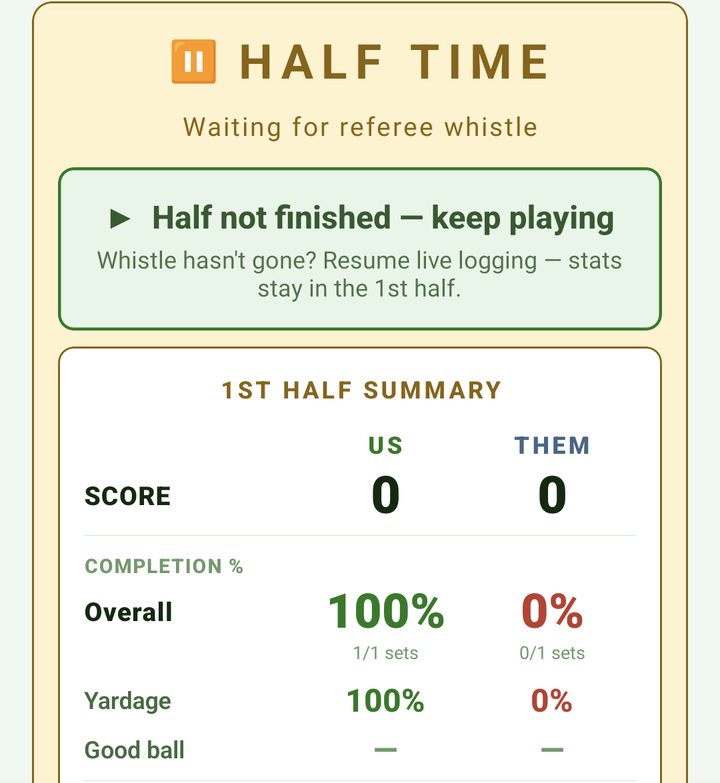
The set breakdown
Tap Set Breakdown under the completion card and every set is laid out in order, ours on the left and theirs on the right, tackle by tackle. The good-ball sets we didn't finish are tinted red.
Each set reads as letters: H hit-up, K kick, T try, E error, P penalty against us, OP penalty to us, IG in goal, 40 for a 40/20, FD forced drop-out, 6 six again and Z the clock.
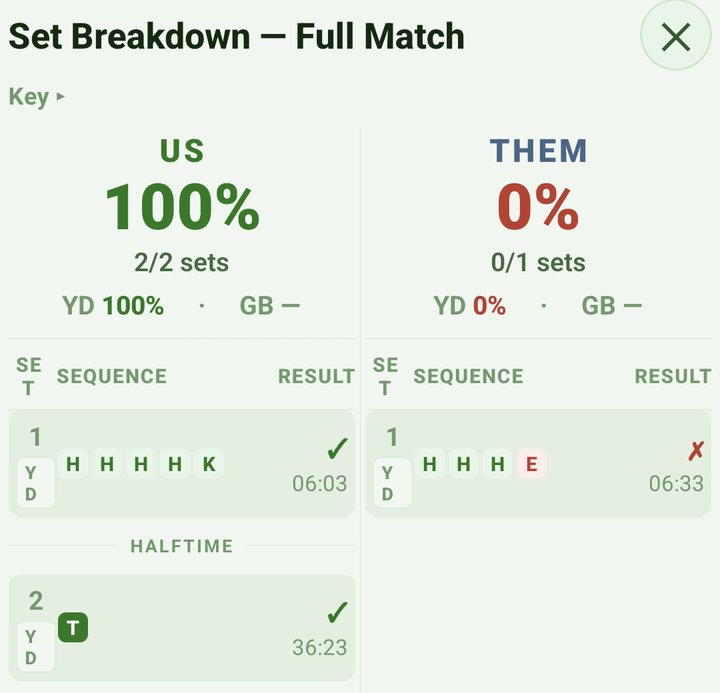
Say a good-ball set reads H H 6 H H E: two hit-ups, a six again, two more, then an error. That's the one to talk about.
You also get each player's hit-ups, tackles, line breaks, errors and minutes, ranked and live. On a U13 and up team, parents and players see them live during the game and on the results screen after it.
Don't skip the kicks. A kick on the last is a completed set. If you don't call it, the set looks unfinished and your completion % reads unfairly low. Call the end of every set, both sides.
Start small
One habit a week.
-
Game 1: sets and score
Set possession at kick-off, log the scores and call the end of every set, both sides: try, kick, error, penalty. That alone gives you live completion %, US against THEM.
-
Game 2: classify the sets
Add the GOOD BALL or YARDAGE flag and the 6 AGAIN button. Half time now shows where the game is won and lost.
-
Game 3: every hit-up and tackle
Pin Hit-up in attack and Tackle in defence, then just tap shirts. You get each player's carries, tackles and minutes: the full sheet.
One person or two
At full-stats pace, logging by tap is a two-person job. One calls the game ("hit up 9, tackle 13, error 7") and the other taps shirts without looking up.
Or one person, by voice. Kickd Callout comes with every pass: you make the same calls out loud and the app logs them.
A Bluetooth headset keeps you hands-free, with your eyes on the field. Call it in by voice has every call and which headsets work.
It's proven at first grade: almost 350 sets and over 3,000 match events across seven first-grade rounds, logged by one person by voice. Mix taps and voice freely. Undo fixes either.
The clock
Stoppages, early whistles, late arrivals.
- Tap Pause for a long stoppage and Resume to go again. On a phone it sits under the field. On a tablet it's the pause button in the top bar.
- The clock stops itself at each break. To end a period early, tap Finish Half (or Finish Q1 and so on for quarters) and confirm.
- At the break, make any changes, then tap Start 2nd Half (Start Q2 and so on for quarters).
- Clock beat the whistle? On the break screen, tap Half not finished, keep playing (Quarter for quarters). Keep logging as normal, nothing spills into the next period, then tap End 1st Half when play stops. Full time has the same button.
- You can lock your phone. The clock keeps running and alerts still come through. If play was stopped while you were away, tap Rewind, play was stopped when you come back.
- Someone turns up late? Tap + Add to Game next to their name under Absent on the live screen.
- The clock counts down each period. Prefer it counting up? Change MATCH CLOCK on the TEAM tab.
Full time
No rush at the huddle.
End the game and pick your player
At full time, tap End Game at the top of the screen. The match ends straight away.
Pick your Player of the Match on the results screen when you've got a moment. You've got an hour after the whistle, and Kickd sends a reminder if you haven't picked.
Your season award
Set it under SEASON AWARD on the TEAM tab.
- Coach 3-2-1: on the results screen, tap + Add 3-2-1 ballot and key each voter's picks. It's 3 points to their best player, 2 to second and 1 to third, with no time limit.
- Player-voted: players vote after each match, for an hour after full time. Their points build a season leaderboard everyone can see.
- Either way, the season table is on the STATS tab under AWARDS, then LEADERBOARD.
- Opens players join with your Player Code (TEAM tab). U13 to U18 players need a parent to switch on their login under PLAYER LOGINS on the parent's TEAM tab.
After the game
- Tap Share result to the team on the results screen to send the score to your group chat.
- Every match is saved on the STATS tab under HISTORY. Tap one for the full match.
- On Team Stats, tap Share PDF there to send the match report to your club or parents.
- Ran a test game by mistake? The head coach can remove it with Delete Match.
No signal
Dead spots, country grounds, carnival days.
- The whole match runs on your device. The clock, the lineup, scores, stats and subs don't need the internet.
- Finished games wait on the device and save to your season as soon as reception returns.
- Parents' live view needs signal. Their screens catch up once they're connected again.
- Voice works with no signal too, once the voice pack is on your phone. Download it at home on Wi-Fi: on the TEAM tab, tap Download in the KICKD CALLOUT row (about 68 MB).
Call it in by voice
Kickd Callout comes with every pass, at every age.
-
Pick your mic
On HOME, tap Bluetooth headset or Phone mic (Tablet mic on a tablet). A headset with a boom mic holds up in crowd noise. The phone or tablet mic suits training or a quiet ground, and you tap the mic button each time you want it to listen.
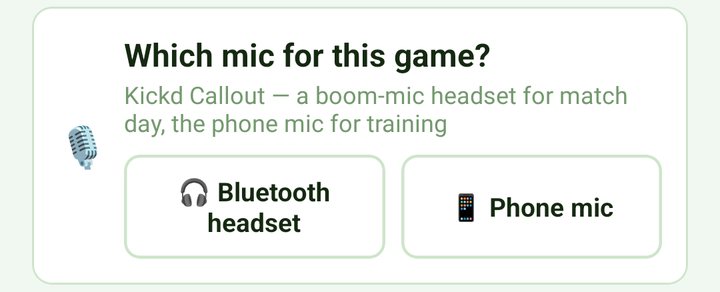
Pick the mic on HOME before the game. -
Arm the mic
If you picked a mic on HOME, it arms itself at the start of play. Otherwise tap the mic button in the top bar. Red means it's logging what it hears, and the bar shows what it heard and what it logged.
-
Mute when you step away
Tap the mic again to mute for sideline chats or stoppages. On the phone or tablet mic, press and hold to mute. Nothing logs while it's muted. The mic stays armed through the break and switches off at full time.
Which headset
A Bluetooth headset keeps you hands-free, with your eyes on the game, so one person can log the whole match by voice. Most Bluetooth headsets work, and coaches have even used smart glasses, but results vary with noise cancelling. The Shokz OpenComm 2 boom mic is the best tested on a noisy sideline.
Mix taps and voice freely. Undo fixes either.
Voice comes with every pass. On Team Pass you call the scores (a conversion counts +2 straight away, and their scores need no ball number), sin bins, send-offs, head bins, interchanges, pause and undo. On Team Stats every call on this page as well. Calls marked Team Stats need Team Stats. Junior teams have their own, shorter list. U10 to U12 teams with Extended Stats switched on can use this one too, apart from sin bin, off field, sent off and on report, which start at U13.
Our team say the shirt number
Opposition then the ball their set ended on, 1 to 6
Say the number as a word: "nine", "twenty three". Two players in one call: say both numbers, "and" is optional. Mis-spoke? Say "undo".
Speech recognition runs on your device. Your audio is never recorded, stored or sent anywhere.